Exploring CanYouRunIt: A Comprehensive Guide
- Get link
- X
- Other Apps
Introduction:
In the fast-paced world of PC gaming, staying up-to-date with hardware requirements for the latest games can be a daunting task. With the constant evolution of graphics technology and game development, ensuring your PC can handle the demands of new releases is crucial for an optimal gaming experience. This is where tools like CanYouRunIt come into play. CanYouRunIt is a popular online service that allows gamers to assess whether their computer meets the minimum and recommended requirements for specific games. In this comprehensive guide, we will delve into the functionality, accuracy, and usefulness of CanYouRunIt, as well as explore alternative methods for benchmarking your PC.
Understanding CanYouRunIt:
CanYouRunIt, often abbreviated as CYRI, was developed by System Requirements Lab, a company that specializes in providing software and services to assess computer hardware and software compatibility. The primary purpose of CanYouRunIt is to analyze your PC's hardware configuration and compare it against the system requirements of various video games. This enables users to determine whether their computer meets the necessary specifications to run a particular game smoothly.
How CanYouRunIt Works:
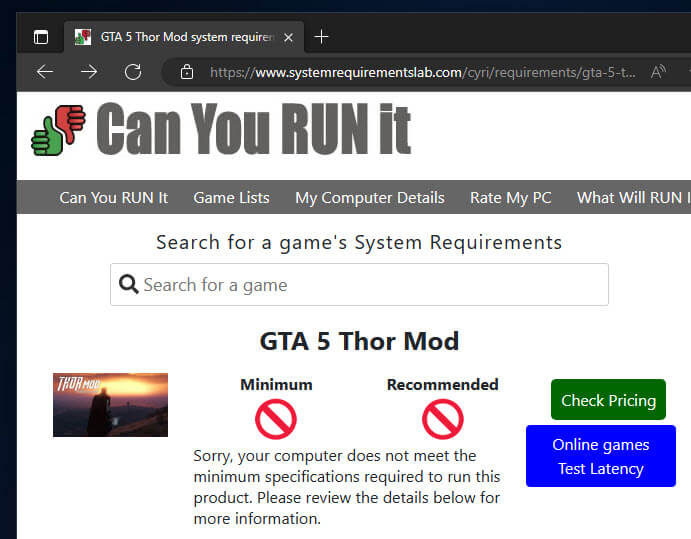
Using CanYouRunIt is a straightforward process. Users simply visit the CanYouRunIt website and search for the game they are interested in assessing. The website maintains an extensive database of games, ranging from recent releases to classics. Once the desired game is selected, CanYouRunIt runs a diagnostic scan of the user's system, collecting information about their hardware components such as CPU, GPU, RAM, and storage.
After gathering the necessary data, CanYouRunIt compares the user's hardware specifications against the minimum and recommended requirements specified by the game developers. The results are then displayed to the user, indicating whether their system meets, falls below, or exceeds the necessary hardware specifications. Additionally, CanYouRunIt provides detailed information about each hardware component and suggestions for potential upgrades if needed.
Accuracy and Reliability:
One of the primary concerns users may have when using CanYouRunIt is the accuracy of its assessments. While CanYouRunIt provides a convenient way to quickly gauge a system's compatibility with specific games, its accuracy may vary depending on several factors.
Firstly, CanYouRunIt relies on the information provided by the user's system during the diagnostic scan. If the user's hardware information is inaccurate or outdated, the results generated by CanYouRunIt may not reflect the true capabilities of the system. Additionally, CanYouRunIt's database of games and their system requirements may not always be up-to-date, leading to discrepancies between the listed requirements and the actual demands of newer titles.
Despite these potential limitations, CanYouRunIt generally provides a reliable estimation of a system's ability to run a given game. However, users should interpret the results with caution and consider consulting additional sources for a more comprehensive assessment of their PC's gaming capabilities.
Utilizing CanYouRunIt Effectively:
To maximize the effectiveness of CanYouRunIt, users should ensure that their hardware information is accurate and up-to-date before running the diagnostic scan. This can be done by regularly updating device drivers and system information.
Additionally, users should be aware that meeting the minimum requirements for a game does not guarantee optimal performance. While a system may technically be able to run a game with minimum specifications, the gaming experience may be subpar, with lower frame rates, reduced graphical fidelity, and potential performance issues during intense gameplay sequences.
Therefore, users should aim to meet or exceed the recommended requirements whenever possible to enjoy a smoother and more immersive gaming experience. CanYouRunIt's assessment of a system's compatibility with a game's recommended specifications can help users determine whether any hardware upgrades are necessary to achieve optimal performance.
Alternative Benchmarking Methods:
While CanYouRunIt is a convenient tool for quickly assessing a system's compatibility with specific games, there are alternative methods for benchmarking PC hardware performance.
One popular alternative is to use dedicated benchmarking software such as 3DMark or Unigine Heaven. These programs are specifically designed to stress-test hardware components such as the CPU and GPU and provide detailed performance metrics and scores.
Another approach is to manually compare a system's hardware specifications against the recommended requirements provided by game developers. By researching the hardware requirements of a particular game and comparing them against the specifications of your PC, you can make an informed decision about whether your system is capable of running the game satisfactorily.
Conclusion:
CanYouRunIt is a valuable tool for PC gamers seeking to assess their system's compatibility with specific games quickly. While its accuracy may vary depending on factors such as hardware information accuracy and database currency, CanYouRunIt generally provides reliable estimations of a system's gaming capabilities.
By utilizing CanYouRunIt effectively and considering alternative benchmarking methods, PC gamers can make informed decisions about hardware upgrades and optimize their gaming experience. Whether you're a casual gamer or a hardcore enthusiast, CanYouRunIt can help ensure that your PC is ready to handle the demands of the latest gaming titles.
- Get link
- X
- Other Apps

Comments
Post a Comment